Work type remits
Setting the work types that a service provider provides
Go to the contact (service provider) card
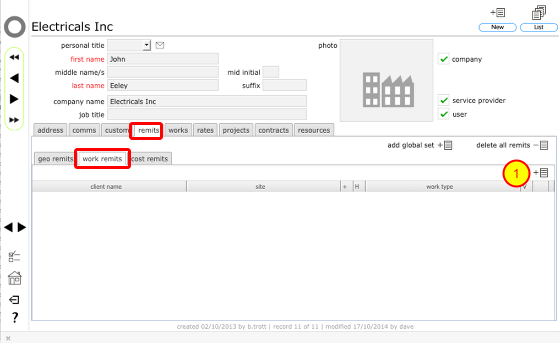
On the contact's card, click the remits tab. To add a new work remit, click the work remits tab. Then click the New button at the top of the work remits tab list (1).
Confirm client for this remit
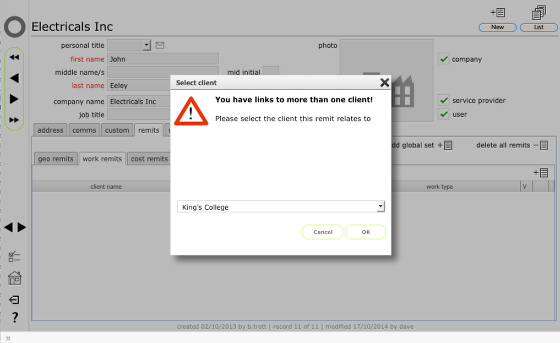
If you have links to more than one client you will see this dialog where you can confirm from the drop down list which client this remits will relate to. Select the client's name and click OK to continue.
Confirm site specific remit
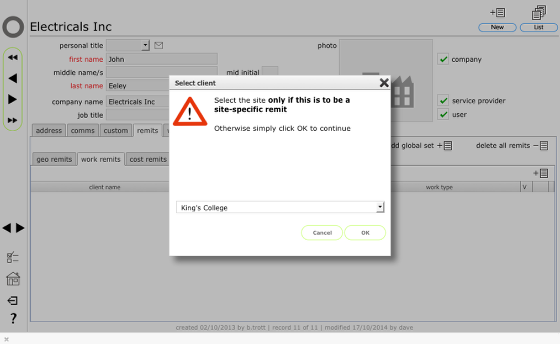
If you have links to more than 1 site you will see this dialog where you can specify a site specific remit if that is required. If you do not specify a site here then the remit will apply to all sites for the client.
Click OK to continue.
Select work type
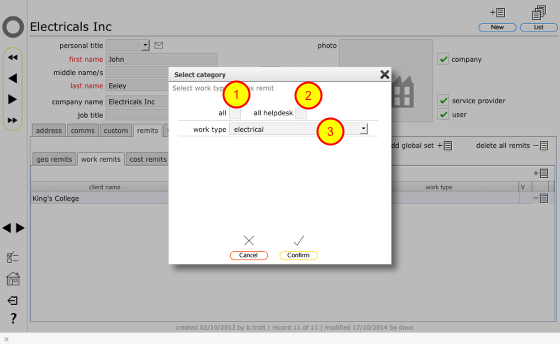
To set a global remit to allow this service provider to be sent works instructions for all worktypes, click the all tickbox.
To set a remit to allow this service provider to be avaliable for all helpdesk issues, click the all helpdesk tickbox.
To set a specific work type remit, use the drop down lists to select the work type for this remit.
Click Confirm to add the remit to the list.
Add additional specific remits if necessary.
Removing a work remit
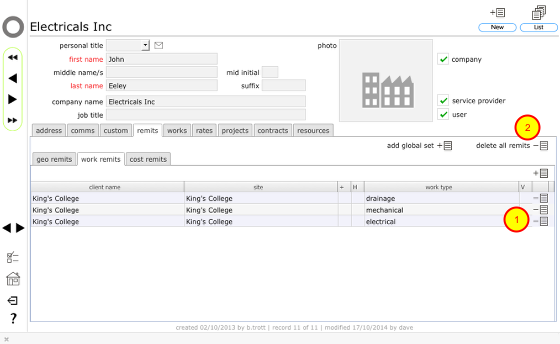
To remove a work remit click the Delete button for the relevant remit (1).
NOTE: You can also remove ALL remits in one go (geo, cost and worktype) for a selected client using the delete all remits button (2).
Confirm action
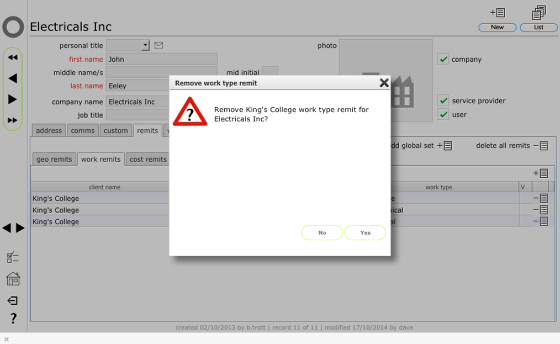
Click Yes to remove the remit.